Monday, 9 November 2015

OnePlus X Review

(I WANT TO THANK FONEARENA GADGET REVIEWS FOR THIS REVIEW) 
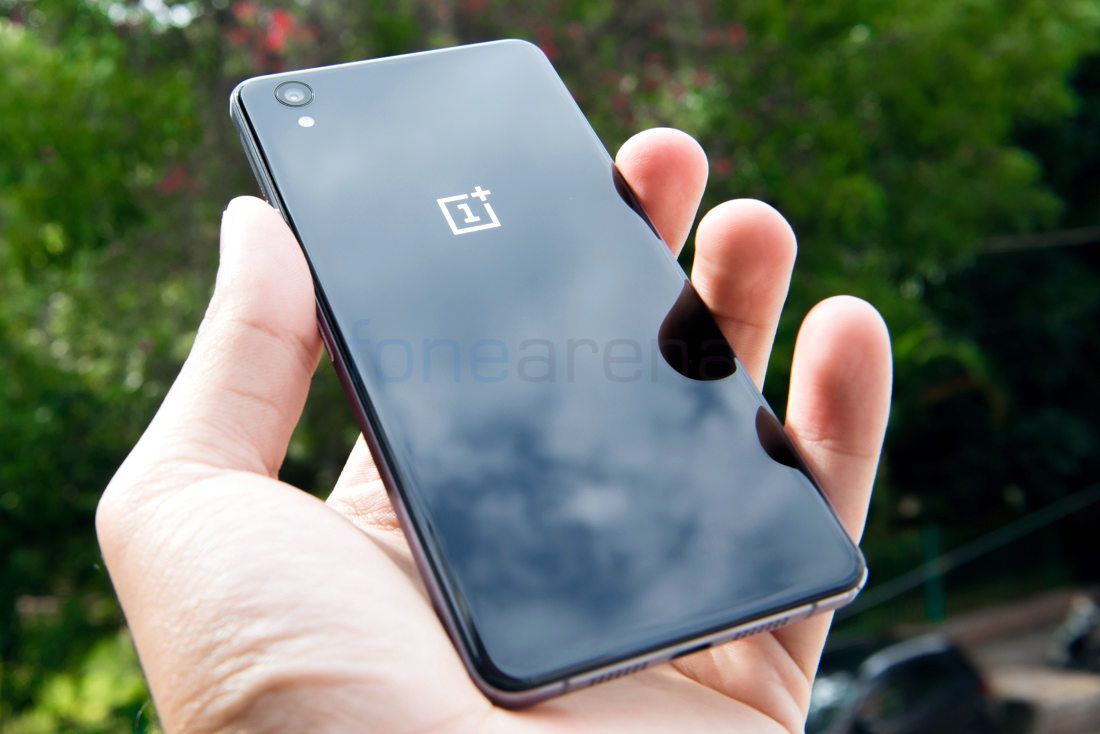
The OnePlus X is probably the first time that OnePlus has really deviated from their design language. Yes, the OnePlus 2 was different from the OnePlus One in a few obvious ways but the basic shape, ergonomics etc remained quite similar. While it did feel like an improvement, people could still probably tell that it was a OnePlus device especially when they touched the sandstone back. The OnePlus X on the other hand feels totally new. The design of the OnePlus X has both glass at the front as well as the back on the Onyx version and a Ceramic back on the Ceramic version.
You’ll have to admit that the OnePlus X does remind you quite a lot about the iPhone 4 and 4S but in a good way. The design feels really premium, perhaps even more so than the OnePlus 2 despite being a lower end handset or rather something that is priced lower. The build quality is really great and it feels great to handle thanks to the small size. While, phablets are slowly becoming more and more accepted by people, there are still quite a few who love handsets that are around 5 inches in display size as it is considered a sweet spot. Despite being a person who loves big screens, I myself agree with that as you just get a sense of freedom and controls with smaller handsets that you just don’t get with phablets. Also considering that most people use cases on their phones, it becomes all the more difficult to handle.
At the front, there is a 5-inch display that takes up most of the real estate. Above it, you have the 8 Megapixel front-facing camera, the earpiece as well as the ambient light and proximity sensors.At the right side, you have the volume rocker and power button. While they provide good haptic feedback, their positioning does seems bit off. We would’ve liked to have the power button above the volume rocker button as that is where our hands seem to rest by default. However, luckily, you do get used to the positioning after a day or two of use. Above the volume rocker, you also have the hybrid dual nanoSIM slot.


At the left side, you have the 3 stage alert slider that can be used to control the notifications. You can choose between all notifications, priority notifications or no notifications at all.At the bottom, you have the micro USB port in the middle along with two sets of grills on either sides. The left grill houses the speaker while the right grill is a dummy to maintain the symmetry and actually houses the primary microphone. You also have the antenna cutouts here.
At the back, you have the 13 Megapixel primary camera with LED flash at the top left corner. Below it, you have the OnePlus logo in a silver finish. At the bottom, there is some regulatory information as well but they have made sure that it doesn’t standout and ruin the look of the phone. You will be able to see it only when you look carefully.


Display
For the first time, OnePlus has gone all out and fitted an AMOLED screen onto their devices. While the OnePlus 2 display was a step in the right direction as OnePlus decided to focus on brightness, colour, viewing angles etc. instead of just sheer resolution, the OnePlus X is where they truly did it right.
The OnePlus X has a beautiful display that looks great in all environments, be it indoors or outdoors. The contrast levels are great as you would expect from an AMOLED display due to the true blacks. The colours are quite vivid without risking being too artificial. The viewing angles too are great and there is no change in colour unless you are looking at the display at nearly zero angles. The sunlight legibility is good but is slightly impaired due to the reflective glass but is still better than most smartphones.
Like we mentioned earlier, the Corning Gorilla Glass 3 does a good job at protecting the device from scratches up front even though we can’t say the same about the back. The 2.5D curved glass is wonderful to use and it feels better than most other 2.5D glass implementations that we have seen. The three capacitive keys below the display do provide haptic feedback but don’t have back-lighting which is a shame considering most handsets in this price range do come with back-lighting unless they opt for on-screen keys. With the OnePlus X as well, users can choose between on-screen or physical keys for navigation. They can also swap the positions of the return and multi-tasking buttons based on their preference. There is also an option to keep the capacitive home button turned on even when using on-screen keys. You can also set shortcut actions for the capacitive keys and specify what has to be done in case of long press or double tap. So you can have two commands for each key.
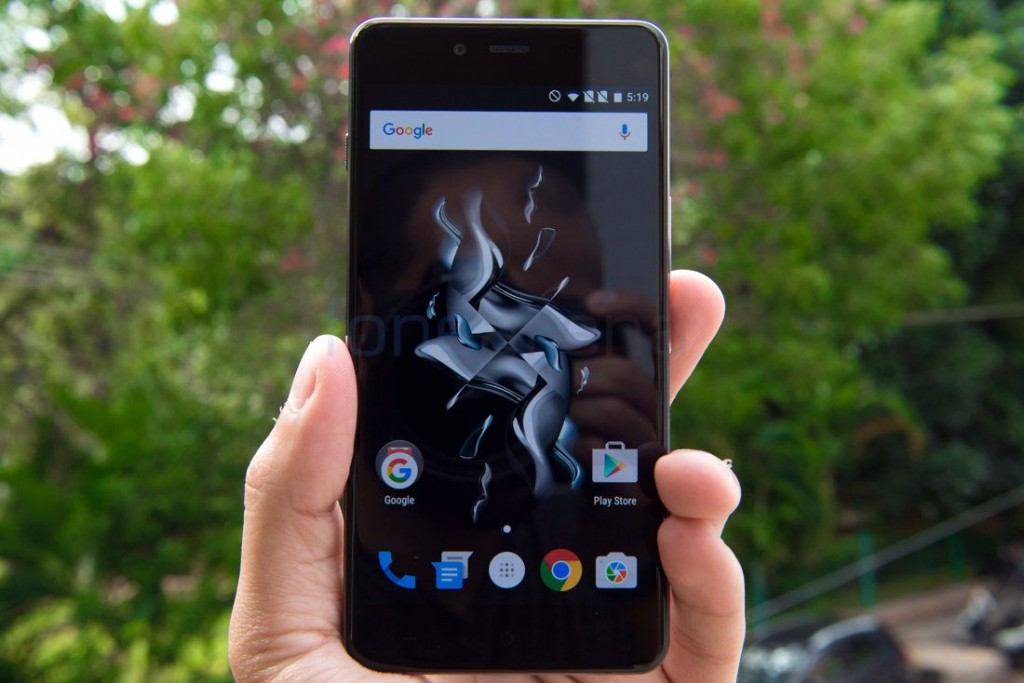
There aren’t any display modes to choose from nor can you adjust the colour temperature. You can wake the device from sleep either by pressing the power key or by double tapping the screen. Users can choose to enable ambient display which will automatically turn on the screen when you receive notifications. This is quite a useful feature and can save you time since you don’t have to manually wake up the device every time to see if you have any notifications. However, it can be quite annoying if you are someone who constantly receives messages on WhatsApp etc. for example. Lastly, there is also a proximity wake feature that makes the phone display the time, date and notifications when you bring your hand close to the device. This makes use of the proximity sensor and is quite useful if you use your mobile phone to tell the time for example.

Software and UI

The OnePlus X comes with Android Lollipop 5.1.1 out of the box with Oxygen UI 2.1.2 on top. The phone should get Android 6.0 Marshmallow as well but OnePlus hasn’t specified when we can expect the update. The overall look and feel of the UI is still very much stock Android and as a result the device is very smooth. However, there are still quite a few unique features that OnePlus have added to make your experience better.
For starters, there is a Dark Mode that you can enable for the system or choose to disable it. (NOTE- We aren’t sure if the update to Android 6.0 Marshmallow will remove this feature or not since Google have chosen to remove it.) You can set the accent colour of your choice as well. Next up is gestures which are basically screen off gestures that you can do when the phone is sleeping. Double tapping the screen will wake the phone up. Drawing an O will open the camera and a V will toggle the flashlight. You can also control your music using gestures. All these gestures can be turned on or off individually or all at once.

Connectivity, Storage and Performance

The OnePlus X is the first smartphone from OnePlus to have a microSD slot. The OnePlus One had either 16GB or 64GB capacities and came with a single micro/nanoSIM slot. The OnePlus 2 added dualSIM ability but came with either 16GB or 64GB capacities as well. The OnePlus X on the other hand comes with a single 16GB storage option for both the Onyx and Ceramic versions but it has a hybrid dual SIM slot.
It can either take two nanoSIMs or one nanoSIM and a microSD card. It accepts microSD cards upto 128GB in capacity. Users can move compatible apps to the SD card as well but as of the date of writing this review, that function doesn’t seem to work well and we keep getting this error message (screenshot below). This however should be solved in the future with a firmware update. The phone has 4G LTE on both the SIM slots however only one SIM can be on 4G at a time while the other will be on 2G. It does support both Band 3 (1800MHz) and Band 40 (2300MHz) in India. The European and Indian variants seem to have the same bands while the American variant has different LTE band support as well as a different model number.

In terms of connectivity, the smartphone has a micro USB port and not a USB Type-C port like on the OnePlus 2. This could be a negative or a positive based on how you view it. There is Bluetooth 4.0 as well as WiFi 802.11 b/g/n. Unfortunately there is no support for Dual-Band WiFi nor ac standard which is a shame for a phone at this price range. The phone does support USB OTG (on-the-go) as well but you need to enable it within the storage settings first to use it.
The smartphone packs a Snapdragon 801 processor as well as 3GB of RAM which is the same combination used on the OnePlus One. In terms of performance too it doesn’t really stand out compared to most smartphones that have come out this year as they pack more powerful processors. In terms of Benchmarks, the device performed decently but not great but the real life performance is good enough. The phone runs smoothly at all times and the main thing to state is that there is hardly any heating even when charging the device. You can see a few of the Benchmark scores below but for a full list of benchmarks, you can check the following article. We will be doing our gaming review of the smartphone soon as well and will keep you posted regarding results of the same.

Conclusion

Although the OnePlus 2 is the flagship in the current lineup of device from OnePlus, it still followed many of the trends set by the OnePlus One and while that is fine for any other company, it isn’t what people expect from OnePlus. For a company that has Never Settle as their slogan, people expect more and that is what they have done with the OnePlus X. The smartphone is probably their boldest move yet, at least when you look at this year. In terms of design and build quality, the OnePlus X easily bests its bigger brother, the OnePlus 2 which is a testament to their craftsmanship. The screen too is beautiful and the phone packs quite a lot of performance into a small form factor. Yes, the processor is a bit dated but there are plenty of people out there who still buy a OnePlus One which also has the same processor. But there are many who shy away from the device largely due to the size and the OnePlus X will definitely try and bring those people back in. Is this is smartphone with no negatives at all? No it isn’t but it is worth the asking price of Rs. 16,999.
Pros
  • Brilliant Display
  • Great Ergonomics and Design
  • Good Build Quality
  • Hybrid Dual SIM Slot
  • No Overheating

Cons
  • Slippery Back
  • No Backlighting for Capacitive Keys
  • No Dual Band WiFi and 802.11 ac Standard Support
  • Feeble LoudspeakerONEPLUS X REVIEW


Saturday, 7 November 2015

YU Yureka CM13 gets you Android 6.0 Marshmallow Update unofficially

The Android 5.1 update was released unofficially for Yureka only few days ago but now you can even get Android 6.0 Marshmallow update on the YU’s first ever device.
The 6.0 update comes in the form of a CM13 custom ROM, which is short for CyanogenMod 13. Yureka CM13 lacks popular features of the ROM in current stage, but it still packs in Marshmallow update, something you have been craving for over a month now.
That sums up tremendous week for Yureka users because they now have a Android 6.0 build available unofficially, while 5.1 Lollipop update available officially.
We hope great thing software don’t end up here for Yureka users, and hope they get another cool Marshmallow ROMs — based on CM13 or AOSP — which can be expected soon too, quite rightly.
Some other Marshmallow ROMs — CM13 and others — we have covered in the past have been linked below. Do share this and others Marshmallow guides with friends on social networks so that anyone looking for Marshmallow update feels thankful.
For now, if you were looking for how to update Yureka to Marshmallow to then look no further than the guide we have stitched together right below.

Downloads

→ Check out this source page (or here, by Santhosh) for latest download links, and what’s working, and what’s not with latest release.
[As on November 07, issues with this ROM include: broken data connection, broken SD card, and some others.]

Supported devices

  • YU Yureka, codename tomato
  • Don’t try this on any other device whose codename is different than the one specified above.
Important: Check your device’s codename on free Android app called Droid Info. If you see the codename mentioned above in the app, then use this recovery, otherwise not. BTW, you can check device’s codename on its packaging box too.

Warning!

Warranty may be void of your device if you follow the procedures given on this page. You only are responsible for your device. We won’t be liable if any damage occurs to your device and/or its components.

Backup!

Backup important files stored on your device before proceeding with the steps below, so that in case something goes wrong you’ll have backup of all your important files.

How to Install

Step 1. You will need to have TWRP recovery installed on your Yureka to be able to update it to Marshmallow. To install now, check out our page onYureka TWRP recovery.
Step 2. Download the CM13 Marshmallow ROM and gapps file from above.
Step 3. Connect your device to PC and transfer the ROM and gapps file to it. Disconnect the device then. Remember the location of the files.
Step 4. Boot your Yureka into recovery mode. If you are rooted, you can useQuick Boot app from play store. To manually boot into recovery mode, do this:
  • Power off your device and wait for 5-10 seconds until the device is fully switched off.
  • Press and hold down + Power button together and release them after 3-4 seconds.
You will enter recovery mode soon, and should see TWRP recovery. If you see 3e recovery, then you need to install TWRP recovery for this. See the link above step 1.
Step 5. [Optional] Once in TWRP, create a backup of your device. Tap onBackup, and then select all the partitions for back. Now do the swipe action at bottom to start creating a backup for emergency cases. This backup is really a lifesaver!
Step 6. Do a Factory Reset. On TWRP’s main screen, tap on Wipe, and then do the Swipe action bottom to confirm it.
Step 7. Now, install the ROM file. On TWRP’s homescreen, tap on Install, and then locate the ROM file and tap on it. Then do the Swipe action at bottom to begin flashing the update.
When it’s done, tap on Reboot system button to restart the device. Let device alone and adjust to Marshmallow update for like 15 mins. Then, reboot into TWRP again to install Gapps.
Step 8. Tap on Home button to go back. Now, install the Gapps the same way you installed Marshmallow ROM on your Yureka.
Step 9. When it’s done, tap on Reboot system button to restart the device.
That’s it.
BTW, if you still face force close errors on apps, or Google Play services error, then install the ROM as said above again, but do not flash Gapps for now.

Thursday, 5 November 2015

Micromax Canvas 5 Octa Core Powered With 3 GB Ram Launched For 11999

After the great success of Canvas Series,micromax got failed due to grand entry of chinese giants and giants almost killed micromax because of trust & priceworthy quality of chinese smartphones and micromax phones suffered alot with their launches like silver 5.0 and other recent releases.

To regain the value of micromax they have launched Canvas 5 with octa core processor and grand 3 GB ram and micromax has also improved the build quality as well as features of phone to compete with Chinese giants who have well  settled in Indian market.

Micromax today launched a new handset in the Canvas series, it’s called theMicromax Canvas 5 e481. This is a dual SIM handset with 4G LTE support and is powered by MediaTek Octa Core processor. Canvas 5 is running Lollipop with 3GB on-board RAM.

The Canvas 5 (e481) houses the MediaTek MT6753 64 bit octa core chipset clocked at 1.3GHz coupled with Mali T-720 GPU. Android Lollipop 5.1 runs out of the box over a 5.2 inch IPS screen with 1920 x 1080 pixels resolution. The screen comes with gorilla glass 3 protection and using a 2.5D curved glass.

Canvas 5 with a metal frame is loaded with 3GB RAM, 16GB storage and external microSD card support of up to 64GB. Weight with battery is 143 grams and thickness is 8.5mm. A 13MP AF camera with LED flash is packed on the rear and secondary front facing camera is 5MP resolution with front flash.Key features are 4G, 3G, 2G, WiFi, GPS and Bluetooth 4.0. The Micromax Canvas 5 gets power from a 2900 mAh battery that as per the company gives up to 10 hours of talk time. The handset is priced at 11,999.Micromax Canvas 5 Features


Wednesday, 4 November 2015

Cyanogen 12.1 update arrived for YU Yureka & Yureka plus

After long waiting of Yureka N Yureka plus users,cyanogen 12.1 (android 5.1.1) update is released for the YUsers. By d way currently users haven't got OTA update yet,but YU Televentures have assured that their yusers will get OTA update in coming week for every yureka n yureka+...Many yusers were angry due to buggy cyanogen(12.0) update provided by company 4 months back..But now YU N Cyanogen have promised that coming update is totally bugfree n yusers will totally enjoy the sweetness of lollipop with additional cyanogen's cherry over the top.

New Cyanogen (12.1) features are as follows

 (What’s new in 12.1:

  • Smarter Screen: LiveDisplay intelligently adjusts your screen based on environmental conditions.
  • Calendar Together with Email: Enjoy the latest Boxer powered experience where you can seamlessly share your availability and schedule appointments.
  • Cyanogen Browser: The new Cyanogen browser delivers search results and loads web sites faster and more securely than leading browsers.
  • Redesigned Launcher: App Drawer and Folders have been redesigned for one-handed use.
  • Fresh AudioFX: The user interface has been updated for consistency across all devices.
  • More Playback support: We’ve substantially increased our support of codecs for video and audio playback.

Now here’s the nitty gritty...    

1)LiveDisplay..........................

-With LiveDisplay, your phone intelligently adjusts the light spectrum coming through your screen based on the time of day. In bright sunlight, the contrast and saturation is increased for readability, and at night the screen reduces the stimulating effect of blue light so as to not disrupt your sleep and/or affect your circadian rhythm. It also doesn’t hurt that the hardware acceleration in LiveDisplay enhances your performance and battery life.

2)Calendar Integration with Email........................................

-Powered by Boxer, our new and improved calendar integration creates a seamless experience between your email accounts and calendars. By letting you sync from multiple sources, including Gmail and Exchange, all your meetings and events appear in one calendar, so you’ll never miss a meeting or party. What’s even cooler is now you can schedule appointments right from an email. That means no more time wasted toggling between your calendar and email. Just share your availability with one tap using the “send availability” option.

3)New Cyanogen Browser...........................
-With faster page loads, improved security, and overall better memory management and performance, the Cyanogen browser provides a more lightweight and secure experience than leading browsers. Want more details? How about these:
  • Performance: 1.21x better than Chrome in top priority benchmarks
  • Speed: 1.69x faster than Chrome in page load benchmarks
  • Power Efficient: 1.2x better in power efficiency
  • Less Memory Used: Lower runtime memory usage—on average 50-100MB less memory (optimized to not consume as much memory)
  • Location Privacy: When websites ask for access to location, the user can choose to allow for 24 hours (as opposed to allowing permanent access), giving the user finer control over their location privacy
  • Security: Saved passwords for websites are encrypted, increasing password security if your phone is ever lost or stolen..

  • Launcher Redesign Improvements......

  • Have a drink in one hand and your phone in the other? No problem. Our redesigned UI for the folders and app drawer streamlines the user experience by focusing on one-handed-use. The new design also reduces visual clutter, enabling you to find what you’re looking for faster.

  • AudioFX UI Updated....................

  • With a clean design and straightforward UI that’s now consistent across all of our devices—plus the 24-bit High-Res Lossless Audio and 13 preset configurations our users know and love—AudioFX continues to help audiophiles get the best possible sound from their audio.

Monday, 2 November 2015

Samsung Galaxy on5 & on7 will be launched today

Samsung to launch galaxy on5 & galaxy on7 today in India.ON 5 & ON7 are midrange devices expected with competative pricetag of of 9k to 15 k..other stories will be cred after the laiunch of both the devices.I will upload the launch event as well as indeapth review as early as possible.just stay tuned for its my first ever blog so plz forgive me if thereis any mistake & as i learned technique to review gadets from gogi techno hub i am sharing the link of gogi.in gadget reviews because gogi teached me how to review gadgets.....thank u gogin

http://feeds.feedblitz.com/~/121917641/0/gogi-technology~Samsung-Galaxy-On-and-On-will-be-officially-launched-tomorrow.html